















Best Laptops Under ₹70,000 in India (August 2026)
🏆 All Best Picks guides › this guide
Seventy thousand rupees is the point where a laptop stops being a compromise. Cross it and you get a current-generation processor, 16GB of RAM as standard rather than a paid upgrade, and a fast SSD, which together mean the machine will still feel quick in four years. This guide covers the best laptops under 70000 in India right now, from a genuinely cheap Dell that clears the bar to a 16-inch OLED that costs almost the whole budget. Six machines, each picked because it is meaningfully different from the others rather than a rebadge of the same parts.
Every laptop below was checked live on Amazon and Flipkart before publishing: in stock, priced inside the budget, and rated by real buyers. Where a machine is worth buying from only one of the two stores, we say so and explain why.
One thing worth knowing before you scroll, because it will save you money: if your budget is flexible, this band is where it pays to stretch. Below about fifty thousand rupees the market is almost entirely entry-level Ryzen 3, Core i3 and Athlon chips paired with 8GB of RAM. Every machine on this list except one has 16GB, and four of the six run a proper mid-range processor. The jump in what you get between fifty and seventy thousand is far larger than the jump in price.
1. ASUS Vivobook 15 (Core i5-13420H)

The best all-round buy in the budget and the machine we would recommend to most people. The i5-13420H is an eight-core H-series chip rather than the low-power U-series parts that dominate cheaper laptops, so it handles heavy spreadsheets, dozens of browser tabs and light video editing without the fan-and-stutter routine. Pair that with 16GB of RAM, a 512GB SSD and a 1.7kg body and there is very little to complain about at around sixty four thousand rupees.
It also has the strongest evidence behind it of anything here, with several hundred buyer ratings on Amazon and a bundled copy of Office Home 2024, which is a real saving if you would otherwise pay for a subscription.
- Pros: H-series eight-core processor is far quicker than the U-series chips in most laptops at this price; 16GB RAM and 512GB SSD as standard; Office Home 2024 included; largest rating base in this guide.
- Cons: Plain FHD display next to the OLED option below. H-series chips run warmer and drain the battery faster than a U-series machine.
| Display | 15.6 inch FHD |
|---|---|
| Processor | Intel Core i5-13420H, 13th Gen, 8 cores |
| RAM and storage | 16GB, 512GB SSD |
| Weight | 1.70 kg |
| Software | Windows 11, Office Home 2024 |
| Buyer rating | 4.1 stars on Amazon, from several hundred ratings |
| Price | Around ₹64,000 on Amazon; the closest Flipkart listing with this processor sits above the budget |
2. Lenovo V15 G4 (Ryzen 5 7520U)

The value pick, and the one to buy if you want 16GB of RAM without spending sixty thousand rupees. What makes this listing unusual is the memory: 16GB of DDR5 running at 5500MHz, which is faster than the DDR4 in several pricier machines here, plus a 512GB NVMe drive. The Ryzen 5 7520U is a modest four-core part rather than a powerhouse, but for office work, classes and browsing it is entirely sufficient, and it sips power.
This is also the one pick where the two stores differ enough to matter. Amazon has it for roughly four and a half thousand rupees less than Flipkart, while Flipkart has a much larger rating base at a slightly higher score. Both are in stock, so it is a straight trade between saving money and having more buyer feedback behind you.
- Pros: Cheapest route to 16GB here, and it is fast DDR5 memory; NVMe SSD; excellent battery behaviour from the low-power chip; strong rating base across both stores.
- Cons: Four-core U-series processor is the weakest of the 16GB machines here. Plain business-grade build and screen.
| Display | 15.6 inch FHD |
|---|---|
| Processor | AMD Ryzen 5 7520U, 4 cores |
| RAM and storage | 16GB DDR5 5500MHz, 512GB NVMe SSD |
| Graphics | AMD integrated |
| Software | Windows 11, Dolby Audio |
| Buyer rating | 4.0 stars on Amazon, 4.2 stars on Flipkart |
| Price | Around ₹55,000 on Amazon, around ₹59,000 on Flipkart |
Check price on Amazon | Check price on Flipkart
3. Dell Inspiron 15 (Intel Core 3 100U)
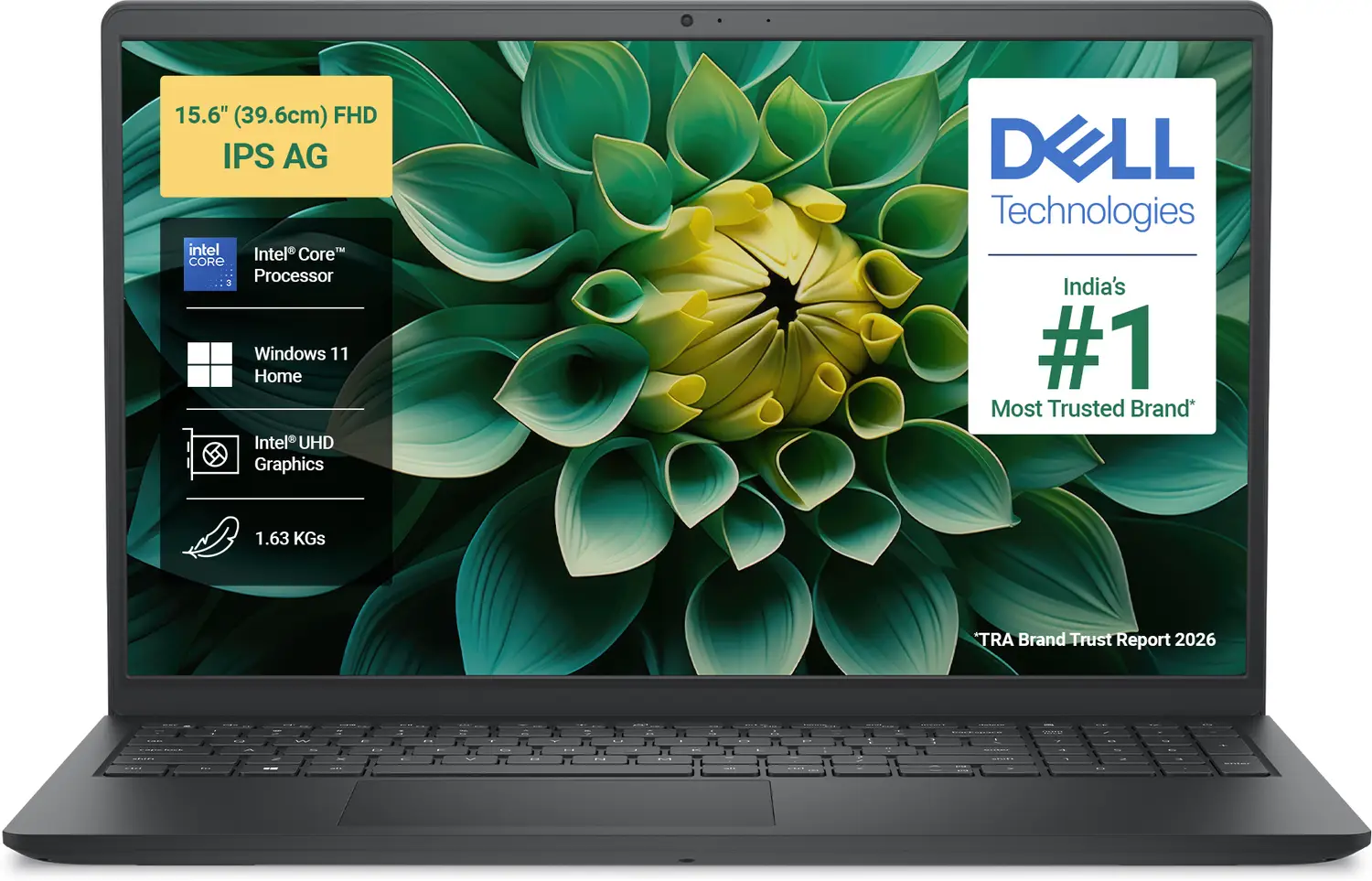
The cheapest machine in this guide by a clear margin, and the pick for anyone who wants a mainstream brand with a service network rather than the maximum specification. At just under forty nine thousand rupees you get a 2025 Inspiron 15 with a 512GB SSD and Windows 11, and Dell's after-sales presence in Indian cities is genuinely better than most.
Be clear-eyed about what you are giving up. The Core 3 100U is an entry-level processor, and this configuration has 8GB of RAM rather than the 16GB in every other pick here. That is the single specification that ages a laptop fastest. If you can find another six thousand rupees, the Lenovo above is the better long-term buy. Buy this one if the budget is genuinely fixed, or if the work is browsing, documents and video calls and nothing heavier.
On price, this is a Flipkart buy: the closest Amazon listing with the same processor costs around ten thousand rupees more.
- Pros: By far the lowest price here; established brand with wide service coverage in India; 512GB SSD; well rated on Flipkart.
- Cons: Only 8GB of RAM, the one pick here that will feel dated soonest. Entry-level processor. Notably cheaper on Flipkart than Amazon, so buy carefully.
| Display | 15.6 inch |
|---|---|
| Processor | Intel Core 3 100U, 14th Gen family |
| RAM and storage | 8GB, 512GB SSD |
| Software | Windows 11 Home |
| Buyer rating | 4.3 stars on Flipkart |
| Price | Around ₹49,000 on Flipkart; the comparable Amazon listing is roughly ₹10,000 dearer |
4. ASUS Vivobook 16 (Snapdragon X)

The interesting one. This runs Windows on a Qualcomm Snapdragon X chip rather than an Intel or AMD processor, which is the same architecture as a phone. The practical payoff is battery life and silence: ARM machines routinely outlast comparable Intel laptops on a charge and run cool enough to stay quiet. You also get a large 16-inch FHD+ screen and 16GB of RAM for around sixty one thousand rupees.
The trade-off is real and you should decide about it before buying, not after. Windows on ARM runs most everyday software fine, including browsers and Office, but some Windows applications, older desktop tools and a lot of games either run slowly through emulation or do not run at all. If your work depends on a specific niche Windows program, or you game on the side, buy one of the Intel or AMD machines here instead. If you live in a browser and Office and want a laptop that lasts all day, this is the most modern thing on the list.
- Pros: Outstanding battery efficiency and quiet, cool running; big 16-inch FHD+ display; 16GB RAM; Office Home 2024 included.
- Cons: Windows on ARM has genuine app-compatibility gaps, especially for older software and games. Modest rating base so far.
| Display | 16 inch FHD+ |
|---|---|
| Processor | Qualcomm Snapdragon X |
| RAM and storage | 16GB, 512GB SSD |
| Graphics | Qualcomm Adreno integrated |
| Weight | 1.88 kg |
| Software | Windows 11, Office Home 2024 |
| Buyer rating | 4.1 stars on Amazon |
| Price | Around ₹61,000 on Amazon; Flipkart stocks the 14-inch version of this machine rather than the 16-inch |
5. HP 14 (Ryzen 7 7730U)

The most processor cores in the budget, in the lightest body here. The Ryzen 7 7730U is an eight-core, sixteen-thread chip, which makes this the pick for work that genuinely uses every core: code compilation, heavy spreadsheets, batch photo edits, or running several virtual machines. At 1.4kg with a 14-inch screen it is also the one machine on this list you would happily carry every day.
The honest caveat is evidence. This is a recent listing with only a handful of buyer ratings, against several hundred for the ASUS at the top of this guide. The hardware is excellent and HP's service network is wide, but you are buying on specification rather than on a track record.
- Pros: Eight cores and sixteen threads, the most compute here; lightest machine in the guide at 1.4kg; 16GB RAM; Office Home 2024 and a year of M365 Basic included.
- Cons: Very small number of buyer ratings so far. The 14-inch screen is cramped for spreadsheet work next to the 16-inch options. DDR4 memory rather than DDR5.
| Display | 14 inch FHD, anti-glare, micro-edge |
|---|---|
| Processor | AMD Ryzen 7 7730U, 8 cores and 16 threads |
| RAM and storage | 16GB DDR4, 512GB SSD |
| Weight | 1.4 kg |
| Software | Windows 11, Office Home 2024, M365 Basic for 1 year |
| Buyer rating | 4.2 stars on Amazon, on a very small rating base |
| Price | Around ₹65,000 on Amazon; the Flipkart machine with this processor is a Pavilion 15 priced above the budget |
6. ASUS Vivobook 16 OLED (Core i5-13420H)

The best screen you can get for under seventy thousand rupees, and the reason to spend the top of the budget. OLED gives you true blacks, far richer colour and much better contrast than the FHD panels on every other machine here, and on a 16-inch canvas the difference is obvious within seconds. Underneath it is the same strong eight-core i5-13420H as our top pick, with 16GB of RAM, a 512GB SSD and a backlit keyboard.
It costs about four thousand rupees more than the 15-inch model at the top of this list, and the only thing you are really buying is the display and the extra inch. If you edit photos, watch a lot of video, or simply stare at the screen for eight hours a day, that is money well spent. If not, take pick one and keep the difference.
- Pros: OLED panel is a genuine step up in contrast and colour; large 16-inch workspace; same eight-core i5 as our top pick; backlit keyboard; solid rating base.
- Cons: The most expensive machine here, and it uses almost the entire budget. OLED panels can retain static images over years of use. Heavier than the 14 and 15-inch options.
| Display | 16 inch FHD OLED |
|---|---|
| Processor | Intel Core i5-13420H, 13th Gen, 8 cores |
| RAM and storage | 16GB, 512GB SSD |
| Keyboard | Backlit |
| Software | Windows 11, Office 2024, M365 Basic for 1 year |
| Buyer rating | 4.1 stars on Amazon, from a couple of hundred ratings |
| Price | Around ₹68,000 on Amazon; the Flipkart listing of this machine sits above the budget |
All six compared
Swipe the table sideways to see all columns →
| Laptop | Processor | Cores | RAM | Storage | Display | Weight | Rating | Sold on | Approx price |
|---|---|---|---|---|---|---|---|---|---|
| ASUS Vivobook 15 | Core i5-13420H | 8 | 16GB | 512GB SSD | 15.6 inch FHD | 1.70 kg | 4.1 | Amazon | ₹64,000 |
| Lenovo V15 G4 | Ryzen 5 7520U | 4 | 16GB DDR5 | 512GB NVMe | 15.6 inch FHD | Not stated | 4.0 / 4.2 | Amazon and Flipkart | ₹55,000 |
| Dell Inspiron 15 | Core 3 100U | Entry level | 8GB | 512GB SSD | 15.6 inch | Not stated | 4.3 | Flipkart | ₹49,000 |
| ASUS Vivobook 16 | Snapdragon X | ARM | 16GB | 512GB SSD | 16 inch FHD+ | 1.88 kg | 4.1 | Amazon | ₹61,000 |
| HP 14 | Ryzen 7 7730U | 8 | 16GB DDR4 | 512GB SSD | 14 inch FHD | 1.4 kg | 4.2 | Amazon | ₹65,000 |
| ASUS Vivobook 16 OLED | Core i5-13420H | 8 | 16GB | 512GB SSD | 16 inch FHD OLED | Not stated | 4.1 | Amazon | ₹68,000 |
How to choose
Decide on the processor class first, because it is the one thing you cannot upgrade later. If your work is browsing, documents, classes and video calls, a low-power four-core chip like the Ryzen 5 in the Lenovo is genuinely enough and will give you better battery life. If you compile code, work in large spreadsheets, edit photos or run virtual machines, the eight-core H-series and Ryzen 7 machines are a different class of computer and worth the extra money.
Then insist on 16GB of RAM. Five of the six picks here have it, and it is the specification that decides whether a laptop still feels usable in 2030. Many machines in this price range solder the memory to the board, so you cannot add more later. That is the main reason the cheapest pick on this list, the Dell, comes with a warning attached rather than a recommendation.
Screen and weight are the last calls, and they are personal. A 16-inch panel is transformative for spreadsheets and multitasking but awkward in a bag; the 1.4kg HP is the only one here you would carry daily without noticing. OLED is a real upgrade rather than a marketing term, though only you can say whether it is worth about four thousand rupees over a good FHD panel.
Finally, check both stores. Five of these six are cheaper or exclusively available on one store rather than the other, and in one case the gap is around ten thousand rupees for the same processor. Prices in this category move weekly, so open the live link before paying.
FAQs
Is 8GB of RAM still enough in 2026?
For light use it works, but it is the first thing that will make a new laptop feel slow, and on most machines at this price the memory is soldered so you cannot add more. Every pick in this guide except the Dell has 16GB. If you are choosing between a better processor with 8GB and a modest processor with 16GB, take the 16GB machine.
Should I buy an Intel, AMD or Snapdragon laptop?
Intel and AMD both run every Windows program without thinking about it, and at this price they are closely matched: pick on the specific chip rather than the brand. Snapdragon machines like the Vivobook 16 above give notably better battery life and run quieter, but some older Windows software and most games either run slowly through emulation or not at all. Choose ARM only if you know your software is browser-based or mainstream.
What does the H in Core i5-13420H mean?
It marks a higher-power processor built for performance rather than battery life. H-series chips typically have more cores and sustain higher speeds than the U-series parts in thinner laptops, so they are noticeably quicker for heavy work, at the cost of shorter battery life and more fan noise. Two picks here use an H-series i5, and they are the fastest machines in this guide.
Do these laptops come with Microsoft Office?
Four of the six include Office Home 2024, and two of those add a year of M365 Basic. That is a real saving worth a few thousand rupees against buying a subscription separately. Always confirm on the live product page before you pay, because sellers change bundles between configurations of the same model.
Can I play games on a laptop under 70000?
Only casual and older titles. None of these machines has a dedicated graphics card, so they rely on integrated graphics, which handles esports titles at low settings and struggles with anything demanding. If gaming is a priority rather than an occasional thing, a dedicated GPU starts above this budget, and the Snapdragon machine here is the least suitable of the six.
More buying guides
Comparing something else? Our Best Picks hub has hand-checked guides for every category and budget - phones, earbuds, smartwatches, laptops, TVs, home and kitchen.
Browse all Best Picks guides →How we pick: our editors shortlist current, in-stock models and rank them by value. Prices change fast - tap a product to see today's live price. Some links are affiliate links; we may earn a small commission at no extra cost to you.
🛍️ DealLooto - We Loot Deals, You Save Big!
Never miss a deal: Join us on Telegram • Join our WhatsApp Channel
👇 Get deals like this instantly
Free alerts on our channels - no spam, just deals.
Join Telegram Join WhatsApp
Comments
Thanks! Your comment has been sent for review.
It is not public yet. Once we approve it, it appears on this page for everyone.
No comments yet. Be the first to say something.